
Machine Diagnostic Expert System Demos
This page showcases a collection of machine diagnostic demos created using VisiRule’s visual troubleshooting flowcharts. Many of these examples are based on existing engineering diagrams that have been re‑expressed in VisiRule. Once modelled visually, the charts can generate interactive web‑based Q&A sessions, deliver diagnostic advice through intelligent chatbots, or operate as embedded rule components within automated workflows.
Using Expert Knowledge for Machine Diagnostics
Equipment failures are common, and repairs are often inexpensive once the underlying fault is identified. VisiRule supports the top‑down diagnostic approach used by engineers, field service technicians, and support teams. The expert system asks broad, high‑value questions first, then progressively narrows the analysis by asking more specific, context‑driven questions until the root cause is found.
After diagnosing the fault, VisiRule can recommend corrective actions or temporary compensatory measures while awaiting a permanent fix. Images, diagrams, and videos can be embedded as dynamic links to support the diagnostic process.
Predictive and Prescriptive Maintenance
There is an old saying:: "Cure the disease before it has happened". Detecting early signs of failure and taking pre‑emptive action is far more cost‑effective than waiting for a breakdown. Modern technology allows specialist knowledge to be captured, packaged, and delivered to a wide audience, helping organisations win new business and support existing customers.
Expert system software provides a rule‑based method for capturing and executing engineering knowledge. Diagnostic expert systems make specialist expertise available to technicians, dealers, agents, and customers, improving support quality and preserving valuable engineering know‑how.
Machine Learning Integration
Where historical data is available, VisiRule can use VisiRule FastChart to incorporate machine learning techniques to help generate or refine the rules used in the diagnostic charts. This blends data‑driven insights with expert‑driven logic..
Using Diagrams and Visual Aids
VisiRule can integrate existing visuals such as wiring diagrams, manuals, and schematics. Unlike a human expert, the virtual engineer is always available—24/7, on any device, and in any location. This enables guided, interactive support for staff, partners, and customers, reducing pressure on internal teams while improving customer satisfaction.
Many of the demos featured here are inspired by the work of Morris Rosenthal and his excellent site at www.ifitjams.com
Other VisiRule Demos
Additional demo pages are available for other domains, including Legal Reasoning, Finance.and more.

Identify problems with car performance
Features a diagnostic system to identify why your car is not running smoothly which includes a simple chatbot which can fast track you directly to the critical part of the diagnostic tree.
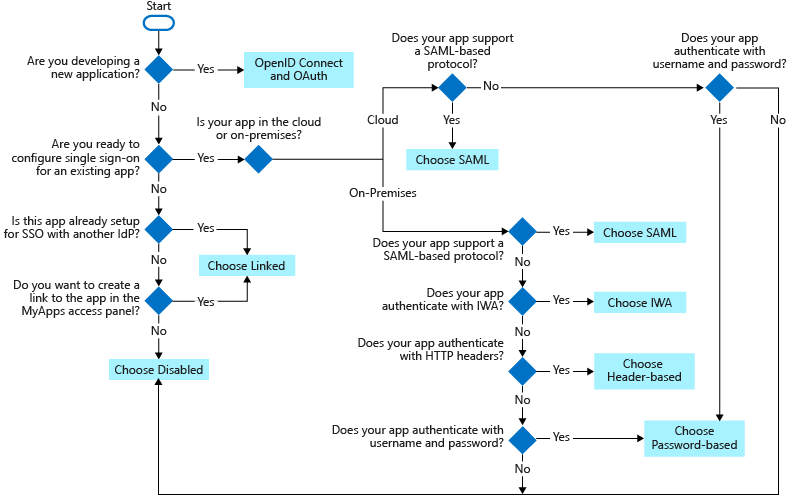
Single Sign On Options
There are several ways you can configure an application for SSO. Choosing an SSO method depends on how the application is configured for authentication.
-
Cloud applications can use OpenID Connect, OAuth, SAML, password-based, or linked for SSO. Single sign-on can also be disabled.
-
On-premises applications can use password-based, Integrated Windows Authentication, header-based, or linked for SSO. The on-premises choices work when applications are configured for Application Proxy.
This flowchart can help you decide which SSO method is best for your situation.

Do the brakes fail to stop the car?
If you have to step on the brake pedal harder than you want to in order for the brakes to operate normally, the brakes do stop the car. What we're interested in here is when you have to push on the pedal with both feet and the car slowly rolls to a stop rather than locking up the wheels, or when the pedal goes to the floor, won't pump up, and you have to yank the emergency brake or turn the engine off in gear in order to slow it down.
Includes a simple chatbot to fast track you directly to the right part of the diagnostic tree.

Trouble with one of the peripherals on your PC?
Do you have trouble with one of the peripherals on your PC?
This flow chart diagnostic from IfItJams can help determine what is going wrong.
Troubleshooting PC Attached Peripherals
Excerpted from Computer Repair with Diagnostic Flowcharts Third Edition

Notebook Won't Connect To Wireless Network
There's nothing more frustrating than sitting down to work with your laptop and finding you can't connect to the Internet in a location you know has a wireless router. Newer laptops with modern versions of Windows do a much better job finding and connecting to local networks than some older models, but in all cases, there are simple steps you can take to troubleshoot the problem. This chart excerpted from the Laptop Repair Workbook, offers a systematic approach to narrowing down the possibilities to help you avoid needless repairs.
Laptop Won't Power On
When your laptop won't turn on with the AC power adapter plugged in, many people assume the adapter has failed and run out to buy a new one. That's an expensive way of troubleshooting a problem that you probably don't have. The flowchart and text are from the collection of twelve flowcharts in The Laptop Repair Workbook which were specifically designed to help you troubleshoot laptop hardware problems before spending money on parts.